Latest DockMaster Web Update Brings Multiple Signatures, Automatic Field Detection, and AI Message Composer

We're excited to announce DockMaster Web 1.7.0—a transformative release that brings the power of artificial intelligence to marina management.
This release introduces intelligent features that save you time, reduce manual work, and elevate your customer communications. From AI-powered message enhancement to automated form field detection, we're making complex tasks remarkably simple.
What's New in 1.7.0
🤖 AI Message Composer: Professional Communication Made Easy
Communicating with customers is essential, but crafting the perfect message every time can be challenging. That's why we've introduced the AI Message Composer—your intelligent writing assistant that enhances messages with professional, context-aware suggestions.
Key Benefits:
- Intelligent Enhancement: Transform quick notes into polished, professional messages with one click
- Customizable Tone: Choose from multiple tone options—professional, friendly, urgent, formal, or empathetic—to match your communication needs
- Customer Context: The AI automatically incorporates relevant customer information like names, company details, and vessels to personalize every message
- Seamless Integration: Available in customer notes and mass notification messaging for consistent quality across all communications
- Simple Workflow: Write your draft, click "Write with AI", and receive an enhanced version while maintaining your original intent
Perfect for:
- Sending payment reminders with the right balance of professionalism and friendliness
- Crafting urgent weather alerts that communicate clearly without causing panic
- Writing formal contract-related communications
- Responding empathetically to customer concerns
The AI Message Composer is included with all paid plans at no additional cost, helping you maintain professional communication standards effortlessly.
🎯 AI Form Field Detection: Hours of Work in Minutes
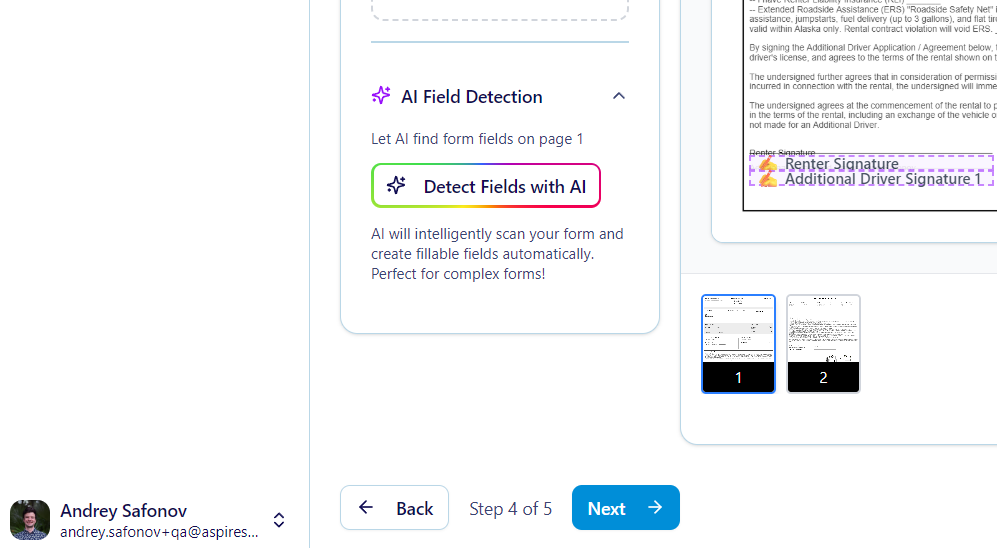
Creating eSignature templates just got exponentially faster. Our new AI Form Field Detection uses advanced vision technology to automatically identify and place form fields on your PDF documents—eliminating tedious manual field placement.
How It Works:
Simply upload your PDF and click "Detect Form Fields". Our AI vision technology analyzes the document and automatically detects:
- Text fields
- Signature blocks
- Initial fields
- Date fields
- Checkboxes
- Radio buttons
- Dropdown menus
The system returns exact coordinates with confidence scores, ensuring precise field placement on every page.
Smart Features:
- Automatic Deduplication: Proximity-based algorithms prevent duplicate field detections
- One-Click Detection: Scan individual PDF pages instantly with a single button click
- Usage Tracking: Monitor feature adoption through Settings > Usage Overview
- High Accuracy: Advanced AI vision delivers reliable field recognition across various document formats
Real-World Impact:
What used to take hours of manual field placement now happens in minutes. Create contract templates, rental agreements, and service authorizations faster than ever before—without sacrificing accuracy.
This feature is available with your document plan subscription, transforming how you build eSignature workflows.
✍️ Multiple Signature Support: Complex Workflows Simplified
Managing documents that require multiple signatures is now streamlined with our comprehensive Multi-Signer Support. This powerful feature enables sophisticated document workflows where different parties sign different sections—all within one unified document.
Advanced Capabilities:
- Individual Field Assignment: Assign specific form fields to individual signers by email address
- Group Assignments: Use group identifiers like "to-recipients" to assign fields to multiple signers at once
- Sequential Signing: Configure signing order to ensure proper sequence with support for multiple rounds
- Signer-Specific Views: Each signer sees only their assigned fields, creating a focused signing experience
- Visual Indicators: Color-coded badges show which fields belong to which signer in the document designer
- Detailed Status Tracking: Monitor each signer's status (pending, viewed, signed) individually with real-time progress updates
Smart Validation:
Our intelligent validation system ensures that form requirements only apply to the current signer's fields—preventing workflow blockages caused by incomplete assignments from other signers.
Workflow Example:
Send a boat storage contract where the customer signs rental terms, the marina manager approves slip assignments, and the insurance coordinator acknowledges coverage requirements—all in one document with proper signing order and field isolation.
Automatic Field Flattening:
Completed fields are automatically flattened after signing to prevent subsequent modifications, ensuring document integrity throughout the multi-signer process.
Additional Improvements
This release also includes important bug fixes and enhancements:
- Enhanced error messages for AI feature subscription requirements
- Improved validation logic for multi-signer field identification
- Better signature image placement across different field types
- Enhanced deduplication for form field detection results
Experience the Future of Marina Management
DockMaster Web 1.7.0 represents our commitment to leveraging cutting-edge technology to make your work easier, faster, and more professional.
These AI-powered features are available now as part of your DockMaster Web subscription. Explore the new capabilities in your account today, or reach out to our team to learn more about upgrading your plan.
Getting Started
Ready to experience AI-powered marina management?
- Current Customers: These features are rolling out automatically—just log in to access them
- New to DockMaster Web?: View our documentation to learn more about our platform
Have questions about the new features? Our support team is ready to help you make the most of these powerful new tools.
