DockMaster Web 2.0: Complete Service Management System Arrives

· 9 min read
Andrey Safonov
Head of Product @ DockMaster

We're thrilled to announce DockMaster Web 2.0.0—our biggest release ever, featuring a comprehensive Service Management system that transforms how marinas handle every aspect of service operations.

This milestone release brings desktop-class service capabilities to the web platform, including complete estimate and work order management, advanced scheduling with drag-and-drop calendar views, and powerful bulk document processing. With over 102,000 lines of new code across 521 files, version 2.0 represents months of development and the largest enhancement to DockMaster Web since launch.
DockMaster Web Service Management


What's New in 2.0.0

🛠️ Service Management System (Beta)

The crown jewel of this release is our complete Service Management system—designed from the ground up to handle everything from initial estimates to completed work orders, all within an intuitive web interface.

Estimates: From Quote to Approval in Minutes

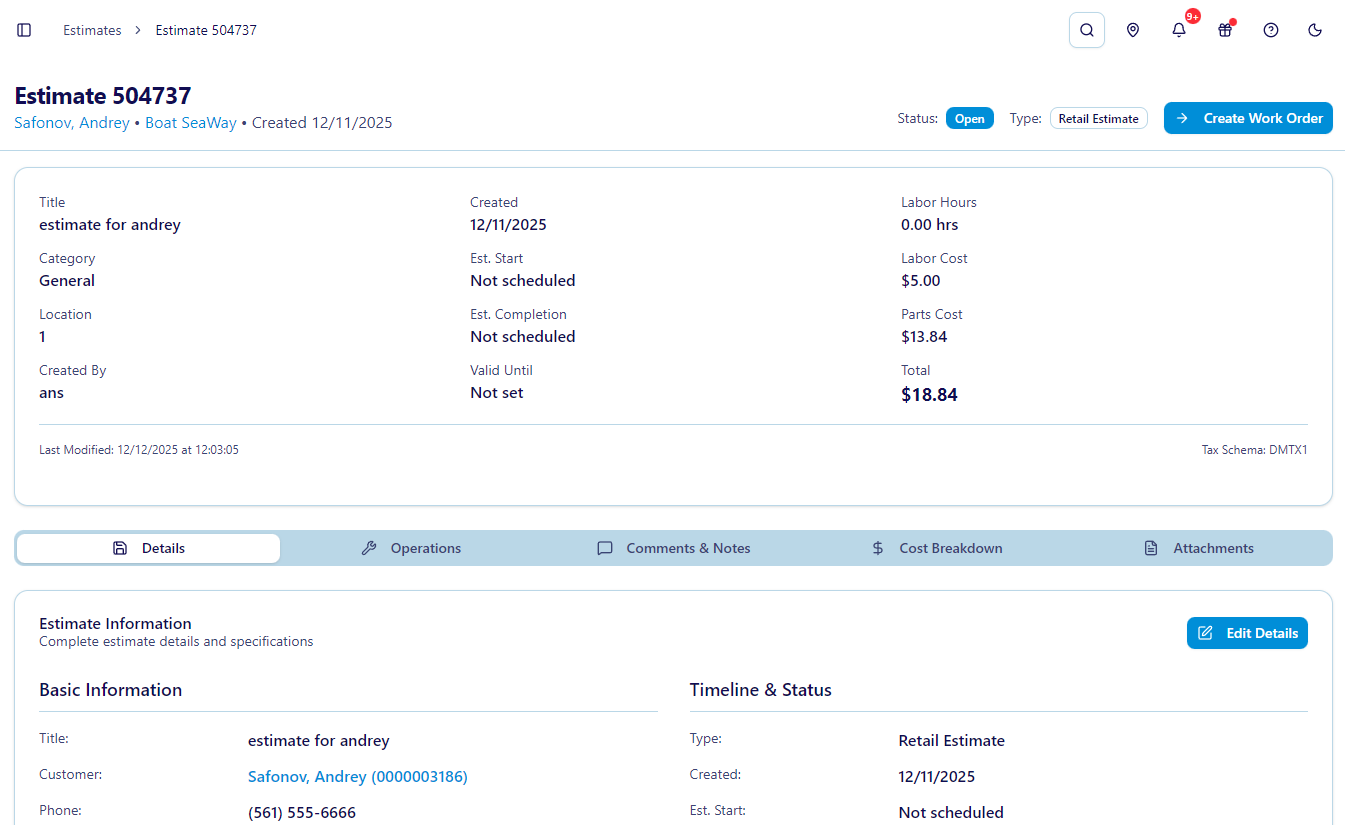
Create professional estimates faster than ever with our multi-step estimate wizard. Simply select a customer and vessel, add operation codes with pricing, and send for approval.

Key Features:

  • Multi-Step Creation Wizard: Guided workflow walks you through customer selection, vessel details, and operation codes
  • Detailed Estimate View: Comprehensive breakdown of operations, pricing, labor, and parts with real-time totals
  • One-Click Conversion: Transform approved estimates into work orders instantly
  • Status Management: Track estimate lifecycle from draft to approved with automatic notifications
  • Smart Search: Find any estimate quickly with advanced filtering and pagination

Work Orders: Complete Lifecycle Management

Manage every aspect of service work from creation to completion with our comprehensive work order system.

Powerful Capabilities:

  • Comprehensive Detail Page: Multiple tabs organize basic info, operations, labor tracking, parts, sublets, and attachments
  • Status & Type Management: Track work order progress from open to completed with custom status types
  • Time Entry System: Log technician hours with accurate labor tracking and cost calculations
  • Parts Integration: Add parts directly to work orders with inventory integration and cost tracking
  • Manager Comments: Internal notes and communications keep everyone informed
  • Approval Workflows: Formal work order approval process with manager sign-off
  • Advanced Search: Find work orders by customer, vessel, status, date, or any custom criteria

Operations Management: The Heart of Service Tracking

Operation codes are the foundation of accurate service tracking, and our system makes them easy to browse, search, and apply.

What You Can Do:

  • Operation Browser: Search across all available operation codes with filtering
  • Detailed Operation Pages: Each operation has dedicated tabs for pricing, labor, parts, and scheduling
  • Labor Tracking: Track technician hours with hourly rates and automatic calculations
  • Parts Integration: Link parts to operations for accurate cost tracking and inventory management
  • Sublet Management: Track external vendor work with proper cost attribution
  • Flat Rate Support: Use flat rate pricing alongside hourly rates
  • Status Tracking: Monitor operation progress from scheduled to completed

Pricing Flexibility:

Support both flat rate and time-and-materials pricing within the same work order, giving you the flexibility to price services however your marina operates.


📅 Advanced Scheduling System

Managing technician schedules has never been easier. Our drag-and-drop scheduling system provides multiple calendar views and intelligent conflict detection.

Calendar Views:

  • Day View: Detailed hourly breakdown for precise scheduling
  • Week View: See your entire week at a glance with color-coded appointments
  • Month View: Long-range planning with month-level visibility
  • Year View: Annual planning and resource allocation
  • Timeline View: Gantt-style visualization of overlapping work

Smart Features:

  • Drag-and-Drop Rescheduling: Move appointments effortlessly across days and technicians
  • Conflict Detection: Automatic alerts when scheduling conflicts arise with smart suggestions
  • Technician Availability: Visual indicators show when technicians are available or booked
  • Bulk Scheduling: Schedule multiple operations at once for efficient planning
  • Color-Coded Labels: Customize schedule labels with colors for visual organization
  • Unscheduled Operations: Dedicated panel shows pending work that needs scheduling
  • Manager & Technician Views: Different interfaces optimized for managers (full control) and technicians (personal schedules)

Session-Based Workflow:

The scheduling system maintains context as you work, remembering your selections and preferences throughout your session for a seamless experience.


📄 Bulk Document Sending: Mass Distribution Made Easy

Send personalized documents to hundreds of customers simultaneously with our intelligent bulk document system.

How It Works:

  1. Upload CSV: Start with a CSV file containing customer data and field values
  2. Automatic Field Mapping: Our fuzzy logic algorithms automatically match CSV columns to PDF fields
  3. Manual Refinement: Fine-tune field mappings with an intuitive interface
  4. Review & Validate: Preview how documents will be populated before sending
  5. Bulk Send: Distribute personalized documents to all customers at once

Advanced Capabilities:

  • Fuzzy Logic Matching: Intelligent algorithms match fields even when column names don't match exactly
  • Customer Validation: Automatic lookup ensures all customers exist in your database
  • Field Management: Add or remove fields during the mapping process
  • Template Integration: Use existing document templates for consistent branding
  • Word-Based Matching: Advanced string matching handles variations in field names

Use Cases:

  • Annual insurance renewal forms sent to all slip holders
  • Season preparation checklists customized per vessel
  • Mass notifications with personalized document attachments

📝 Enhanced E-Signature Capabilities

Building on our robust e-signature platform, version 2.0 adds powerful enhancements for complex document workflows.

New Capabilities:

  • Multiple Signer Support: Documents can now require signatures from multiple parties with individual field assignments
  • Category Code Integration: Organize documents with category codes for better classification
  • Improved PDF Processing: Faster rendering and better field detection for production builds
  • Enhanced Template Import: Better detection of radio buttons, dropdowns, and form fields
  • International Character Support: UTF-16BE decoding handles special characters properly

Workflow Improvements:

The entire signing process has been optimized with better validation, clearer customer portal restrictions, and proper signer identification throughout the workflow.


🔧 Customer & Vessel Management Enhancements

Customer Enhancements:

  • Category Codes: Classify customers by type for better organization and reporting
  • Billing Codes: Custom billing rules per vessel for flexible invoicing
  • Enhanced Search: Find customers faster with improved multi-criteria search
  • Data Validation: Ensure customer information quality with automatic validation

Vessel Enhancements:

  • HIN Support: Proper Hull Identification Number tracking for compliance
  • Category Filtering: Classify vessels by type (powerboat, sailboat, etc.)
  • Service History: Complete service record tracking showing all work performed
  • Vessel Notes: Important vessel-specific information accessible to all staff
  • Enhanced Propulsion Details: Comprehensive tracking of engines, generators, drives, and transoms
  • Quick Search Modal: Fast vessel lookup from anywhere in the application

👥 User Management & Permissions

Clerk Linking:

Users can now be linked to clerks from DockMaster Desktop, providing integrated permissions and seamless desktop-web coordination.

Permission Requirements:

The new Service Management features require proper role permissions to be configured. Marina administrators should review and update user roles to grant appropriate access to estimates, work orders, and scheduling features.


🔔 Enhanced Notifications

Stay informed about service operations with new notification types:

  • Work Order Notifications: Alerts when work order status changes
  • Estimate Notifications: Notifications for estimate approvals and status updates
  • Service Notifications: General service-related alerts
  • Improved Polling: Better authentication checks and more reliable notification delivery

🗺️ Navigation & Integration

Updated Navigation:

  • New Service Management section in the main navigation
  • Nested routes for estimates, work orders, operations, and scheduling
  • Transactions section (renamed from Payment Processing) with Beta badge
  • Improved flow between related features

Desktop Integration:

The DME (DockMaster Engine) service provides alignment with DockMaster Desktop APIs, enabling batch request/response handling and ensuring data consistency between platforms.


🔐 Additional Enhancements

  • Clerk Management: Dedicated clerk selection and validation throughout service features
  • Location Management: Track work across multiple facilities
  • Department Organization: Assign work to specific departments
  • Vendor Management: Complete vendor database for sublet work
  • Schedule Labels: Customizable color-coded labels for visual schedule organization
  • Barcode Scanner: Parts tracking with barcode input support
  • Enhanced Global Search: Find vessels and customers faster from anywhere

Getting Started with Service Management

For Marina Administrators:

  1. Review Permissions: Update user roles to grant access to Service Management features
  2. Explore Estimates: Create your first estimate using the multi-step wizard
  3. Try Scheduling: Open the scheduler and experiment with the drag-and-drop calendar
  4. Link Clerks: Connect web users to desktop clerks for integrated permissions

For Customers:

Service management is currently internal-facing, but future updates will bring customer portal integration for work order visibility and estimate approvals.


What's Next?

Version 2.0 lays the foundation for future service management enhancements. We're already working on:

  • Customer Portal Integration: Estimate/Work order visibility for customers
  • Operation Code Review & Approval: Introduce review and approval workflows at the operation code (opcode) level for more granular control of service processes
  • Inventory Management: Full parts inventory with purchase orders (coming soon)
  • Payment Integration: Process payments directly from estimates and work orders (coming soon)

Beta Designation

The Service Management system is currently marked as Beta while we gather feedback from real-world usage. The features are fully functional and production-ready, but we're actively collecting user feedback to refine workflows and add requested capabilities.


Experience the Future of Marina Service Management

DockMaster Web 2.0.0 brings the comprehensive service management capabilities marinas need to operate efficiently in the modern era. From initial estimates to completed work orders, every aspect of service operations is now streamlined, trackable, and accessible from any device.

These features are available now for all DockMaster Web customers. Log in to explore the new Service Management section and experience the future of marina operations.


Resources

  • Full Changelog: Complete list of all changes in version 2.0.0
  • Support: Questions? Our team is here to help

Have questions about the new Service Management system? Want to share feedback on the beta features? Please report any issues or suggestions to Andrey (Head of Product)—your feedback directly shapes the product roadmap.

Welcome to DockMaster Web 2.0! 🚀
Latest DockMaster Web Update Brings Multiple Signatures, Automatic Field Detection, and AI Message Composer

· 5 min read
Andrey Safonov
Head of Product @ DockMaster

We're excited to announce DockMaster Web 1.7.0—a transformative release that brings the power of artificial intelligence to marina management.

This release introduces intelligent features that save you time, reduce manual work, and elevate your customer communications. From AI-powered message enhancement to automated form field detection, we're making complex tasks remarkably simple.

DockMaster Web AI-Powered Features


What's New in 1.7.0

🤖 AI Message Composer: Professional Communication Made Easy

Communicating with customers is essential, but crafting the perfect message every time can be challenging. That's why we've introduced the AI Message Composer—your intelligent writing assistant that enhances messages with professional, context-aware suggestions.

Key Benefits:

  • Intelligent Enhancement: Transform quick notes into polished, professional messages with one click
  • Customizable Tone: Choose from multiple tone options—professional, friendly, urgent, formal, or empathetic—to match your communication needs
  • Customer Context: The AI automatically incorporates relevant customer information like names, company details, and vessels to personalize every message
  • Seamless Integration: Available in customer notes and mass notification messaging for consistent quality across all communications
  • Simple Workflow: Write your draft, click "Write with AI", and receive an enhanced version while maintaining your original intent

Perfect for:

  • Sending payment reminders with the right balance of professionalism and friendliness
  • Crafting urgent weather alerts that communicate clearly without causing panic
  • Writing formal contract-related communications
  • Responding empathetically to customer concerns

The AI Message Composer is included with all paid plans at no additional cost, helping you maintain professional communication standards effortlessly.


🎯 AI Form Field Detection: Hours of Work in Minutes

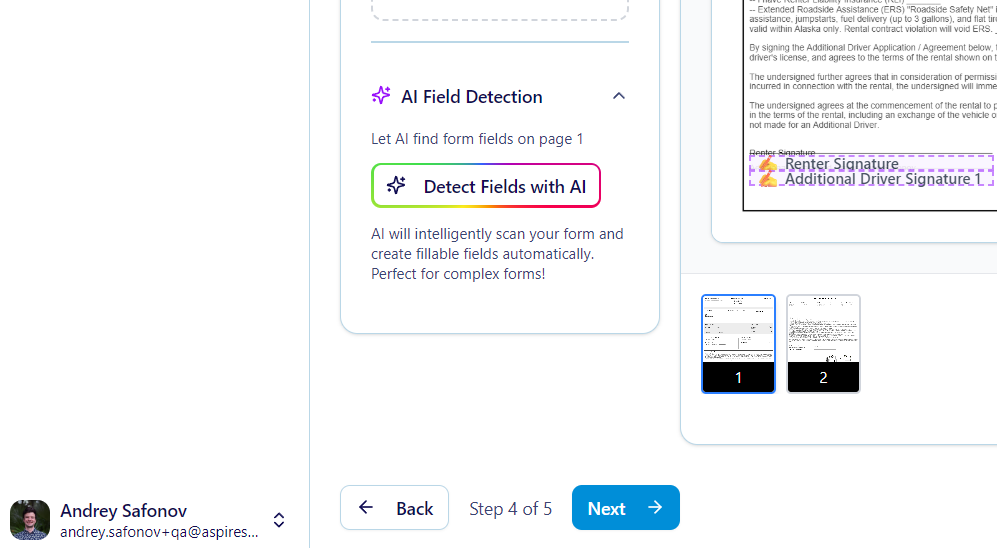
Creating eSignature templates just got exponentially faster. Our new AI Form Field Detection uses advanced vision technology to automatically identify and place form fields on your PDF documents—eliminating tedious manual field placement.

How It Works:

Simply upload your PDF and click "Detect Form Fields". Our AI vision technology analyzes the document and automatically detects:

  • Text fields
  • Signature blocks
  • Initial fields
  • Date fields
  • Checkboxes
  • Radio buttons
  • Dropdown menus

The system returns exact coordinates with confidence scores, ensuring precise field placement on every page.

Smart Features:

  • Automatic Deduplication: Proximity-based algorithms prevent duplicate field detections
  • One-Click Detection: Scan individual PDF pages instantly with a single button click
  • Usage Tracking: Monitor feature adoption through Settings > Usage Overview
  • High Accuracy: Advanced AI vision delivers reliable field recognition across various document formats

Real-World Impact:

What used to take hours of manual field placement now happens in minutes. Create contract templates, rental agreements, and service authorizations faster than ever before—without sacrificing accuracy.

This feature is available with your document plan subscription, transforming how you build eSignature workflows.


✍️ Multiple Signature Support: Complex Workflows Simplified

Managing documents that require multiple signatures is now streamlined with our comprehensive Multi-Signer Support. This powerful feature enables sophisticated document workflows where different parties sign different sections—all within one unified document.

Advanced Capabilities:

  • Individual Field Assignment: Assign specific form fields to individual signers by email address
  • Group Assignments: Use group identifiers like "to-recipients" to assign fields to multiple signers at once
  • Sequential Signing: Configure signing order to ensure proper sequence with support for multiple rounds
  • Signer-Specific Views: Each signer sees only their assigned fields, creating a focused signing experience
  • Visual Indicators: Color-coded badges show which fields belong to which signer in the document designer
  • Detailed Status Tracking: Monitor each signer's status (pending, viewed, signed) individually with real-time progress updates

Smart Validation:

Our intelligent validation system ensures that form requirements only apply to the current signer's fields—preventing workflow blockages caused by incomplete assignments from other signers.

Workflow Example:

Send a boat storage contract where the customer signs rental terms, the marina manager approves slip assignments, and the insurance coordinator acknowledges coverage requirements—all in one document with proper signing order and field isolation.

Automatic Field Flattening:

Completed fields are automatically flattened after signing to prevent subsequent modifications, ensuring document integrity throughout the multi-signer process.


Additional Improvements

This release also includes important bug fixes and enhancements:

  • Enhanced error messages for AI feature subscription requirements
  • Improved validation logic for multi-signer field identification
  • Better signature image placement across different field types
  • Enhanced deduplication for form field detection results

Experience the Future of Marina Management

DockMaster Web 1.7.0 represents our commitment to leveraging cutting-edge technology to make your work easier, faster, and more professional.

These AI-powered features are available now as part of your DockMaster Web subscription. Explore the new capabilities in your account today, or reach out to our team to learn more about upgrading your plan.


Getting Started

Ready to experience AI-powered marina management?

  • Current Customers: These features are rolling out automatically—just log in to access them
  • New to DockMaster Web?: View our documentation to learn more about our platform

Have questions about the new features? Our support team is ready to help you make the most of these powerful new tools.

Introducing DockMaster eSignature: Complete Digital Document Management

· 5 min read
Andrey Safonov
Head of Product @ DockMaster

Revolutionizing Marina Document Management

The marina industry has long relied on paper-based processes for contracts, agreements, and important documentation. Today, we're excited to introduce DockMaster eSignature, a comprehensive digital document platform that transforms how marinas create, send, and manage documents while providing customers with a seamless signing experience.

🔄 A Simple, Four-Step Flow to Handle All Your Documents

Managing signed documents no longer requires juggling printers, scanners, or spreadsheets. With DockMaster eSignature, marinas can follow a streamlined, repeatable process:

DockMaster Web: eSignature Screen


1. Select the Document Source

You can begin from either of two places depending on your workflow:

Option A: Build a Template

  • Use the drag-and-drop builder to create a professional, reusable template.
  • Add smart fields like signature boxes, initials, checkboxes, dates, and dropdowns.
  • Save and organize templates for future use.

Option B: Publish from DockMaster Desktop

  • Generate a document directly in DockMaster Desktop and send it to the web with one click.
  • All customer data, formatting, and structure are preserved.
  • Seamlessly continue your existing workflows without interruption.

2. Send to Customers — One or Many

Once your document is ready, sending it is quick and flexible:

  • Send to a single existing customer: Auto-filled with their DockMaster profile.
  • Send to multiple customers via CSV or list:
    • Upload a .csv or paste a list of emails separated by ;.
    • Map customer fields like name, vessel, or contract ID into the document.
    • Personalize each document dynamically for batch distribution.

No manual copy-pasting or data entry required.


3. Track Submission Status in Real Time

Stay in control and up-to-date with every document:

  • Monitor status: Sent, Signed, Completed
  • See when each customer signs their document
  • Get automatic notifications and alerts
  • Use filters and dashboards to track bulk sends effortlessly

Whether you sent one document or 500, the system keeps you organized and informed.


4. Access Completed Documents

Once signed, documents are instantly available:

  • Download Signed Copies: Retrieve PDFs for your records.
  • Customer Portal Visibility: Customers can access their signed and pending documents 24/7.
  • Automatic Sync: Documents created via DockMaster Desktop or Web are stored centrally and always accessible.

This ensures transparency for both the marina and the customer—without needing follow-up emails or manual coordination.


Precision Document Processing

DockMaster eSignature is built on a robust technical foundation that ensures reliability and accuracy:

High-Precision PDF Engine

  • Pixel-Perfect Accuracy: Advanced PDF processing ensures signatures and form fields appear exactly where intended
  • Cross-Device Consistency: Documents render identically across desktop, tablet, and mobile devices
  • Real-Time Validation: Instant feedback during document creation and signing processes

Enterprise-Grade Performance

  • Lightning-Fast Loading: Optimized document rendering for immediate access
  • Mobile-Optimized Processing: Efficient bandwidth usage for mobile users
  • Scalable Architecture: Handle high-volume document processing seamlessly

Security & Compliance

DockMaster eSignature prioritizes security and legal compliance:

Document Security

  • Encrypted Transmission: All documents protected with industry-standard encryption
  • Secure Storage: Documents stored with enterprise-grade security measures
  • Access Controls: Granular permissions and access management
  • Audit Trails: Complete activity logging for compliance and tracking
  • ESIGN Act Compliant: Meets all federal electronic signature requirements
  • Tamper Protection: Documents protected against unauthorized modifications
  • Identity Verification: Secure authentication for document access
  • Legal Validity: Signatures carry full legal weight and enforceability

🎯 Transforming Marina Operations

DockMaster eSignature represents a fundamental shift in how marinas can operate in the digital age. By providing multiple document creation methods, comprehensive management tools, and an exceptional customer experience, we're enabling marinas to:

  • Eliminate Paper Workflows: Go completely digital while maintaining legal compliance
  • Reduce Administrative Overhead: Automate document distribution and tracking
  • Enhance Customer Experience: Provide modern, convenient document interactions
  • Improve Operational Efficiency: Streamline processes from creation to completion
  • Ensure Legal Compliance: Maintain proper audit trails and legal documentation

The result? Modern, efficient marina operations that delight customers and reduce costs.

Ready to Transform Your Document Process?

DockMaster Web is more than an upgrade—it's a leap forward for marina management.
Empower your team. Delight your customers. Modernize your operation.

Get started today with our generous free tier that includes 10 documents per month.

Introducing DockMaster Web: Modern Marina Management—On the Go

· 4 min read
Andrey Safonov
Head of Product @ DockMaster

We're thrilled to announce the launch of DockMaster Web—a fully modern, responsive experience for marina and service operations.

Built to work hand-in-hand with the DockMaster Desktop platform, DockMaster Web offers complete access from any device, real-time data synchronization, and a sleek new interface for managing internal users, customers, and vessels. And with the addition of a robust Customer Portal, you're giving your clients the self-service tools they've come to expect.

This is just the beginning. We're actively developing exciting new features including a complete eSignature flow, Payments, and Reservations coming this summer. Additional modules like Service, Inventory, Marina Management, and Sales are also on the roadmap for this year.


Why DockMaster Web?

DockMaster Web is built with today's marine professionals in mind. Whether you're at the service desk, on the docks, or remote, you'll have complete access to your business through a secure, web-based interface.

Key Benefits:

  • Access from anywhere: Fully responsive design for mobile, tablet, and desktop.
  • Instant sync: All updates reflect immediately in DockMaster Desktop.
  • Role-based permissions: Manage internal user access per module with read/write roles.
  • Business branding: Upload logos, hours, and marina photos to personalize your Customer Portal.
  • Customer management & communication: Email, SMS, notes, and portal invitations all in one place.

Introducing the Customer & Vessels Module

Gain a complete view of your customers and their vessels—without switching tabs.

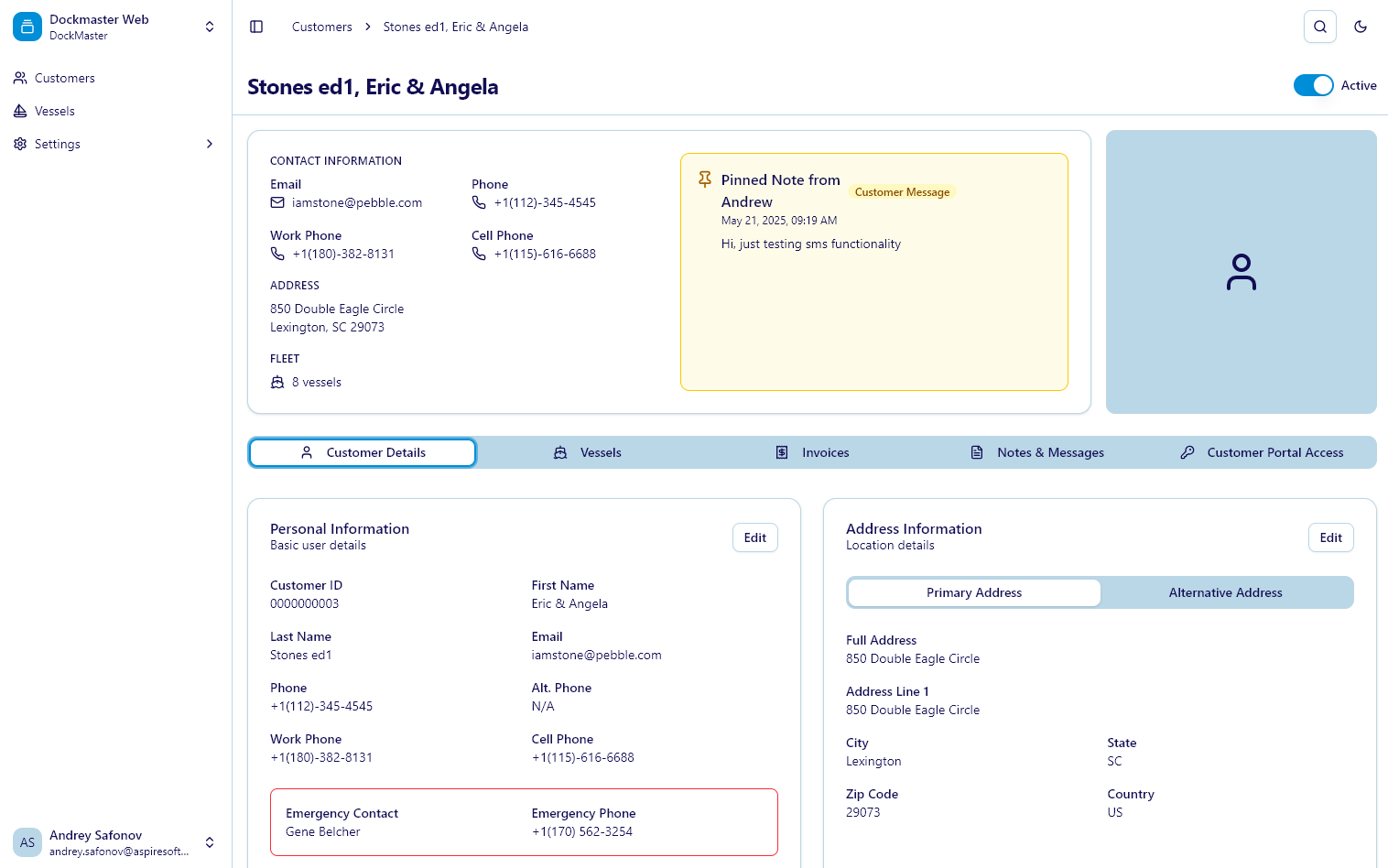
DockMaster Web: Customer Details Screen

The Customer & Vessels module provides a centralized, intuitive workspace to manage customer data, vessel records, communications, and portal access.

Everything in One Place

  • View all customer details at a glance—contact info, emergency contacts, addresses, and invoices.
  • Organized multi-tab layout for Customers, Vessels, Invoices, Portal Access, and Messages.
  • Registration links for portal access are shareable via clipboard for instant onboarding.

Communication That Works

  • Reach customers through built-in email and text messaging.
  • Add internal notes and pin important messages to customer profiles.
  • Keep track of all interactions with full activity history and audit trails.

Comprehensive Vessel Oversight

  • See detailed vessel specifications, including LOA, draft, beam, and HIN.
  • Manage slip assignments and track insurance policies with visual expiration alerts.
  • Upload vessel photos to a personalized media gallery.
  • Track service history, including past work and uploaded documents.

Simplified Customer Onboarding

  • Quickly create and assign customer portal access using a searchable customer database.
  • Support for multi-customer linking and dynamic external user management.

Customer Portal: Empower Boaters with Self-Service

Modern, secure, and mobile—give your customers the experience they expect.

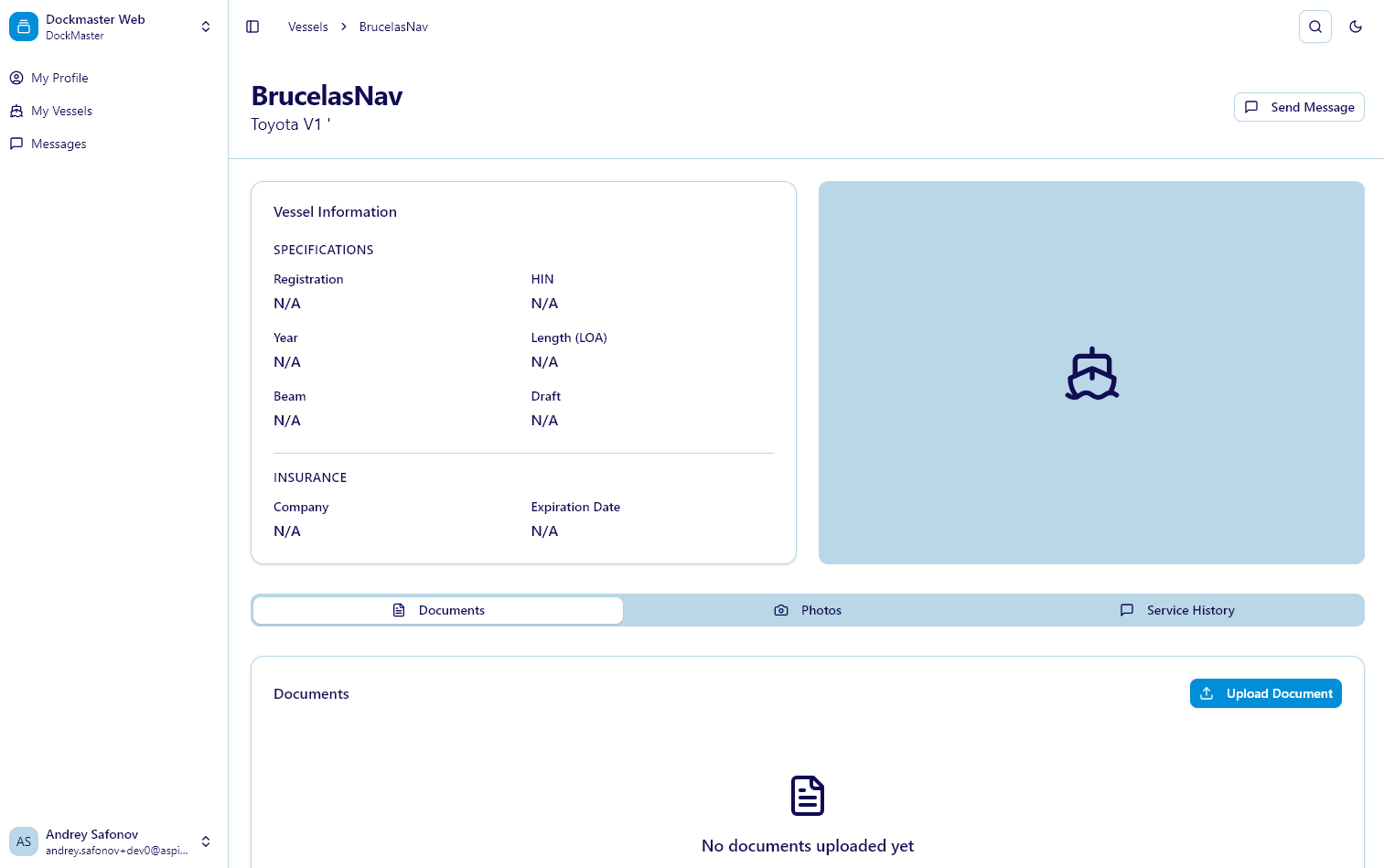
DockMaster Web: Customer Details Screen

The Customer Portal brings transparency and convenience to your boaters. With self-service access, they can manage their data, documents, and communication with ease.

Self-Managed Profiles

  • Update contact information, multiple addresses, and phone numbers.
  • Tabbed layout and inline editing for seamless profile updates.

Vessel Management in Their Hands

  • Upload vessel documents like registration, insurance, manuals.
  • Add photos to vessel galleries for a professional or personal archive.
  • Review vessel specs, insurance status, and service history—anytime, anywhere.

Seamless Communication

  • Use the Notes & Messages tool to chat directly with marina staff.
  • View entire message history with read receipts and timestamps.
  • Mobile-friendly design and a familiar messaging interface make communication effortless.

Unified Access Across Locations

  • One login works across all marinas using DockMaster Web.
  • Customers can share access with co-owners, crew members, or accountants as needed.

Ready to Set Sail?

DockMaster Web is more than an upgrade—it's a leap forward for marina management.
Empower your team. Delight your customers. Modernize your operation.

Get started today with our generous free tier that includes 5 GB of storage and 100 text messages per month.